
Team collaboration for social media.
Invite team members and clients into one workspace. Shared calendar, approval workflows, post comments, @mentions, and role-based permissions — all without per-seat fees.
- Flat pricing
- Roles & permissions
- Approvals


Trusted by agencies and brands in 30+ countries





















Collaborate in 3 steps
Invite your team
Send an email invite with a role. They join in one click.
Create and assign
Members draft posts and pick approvers when needed.
Approve and publish
Approvers sign off. Posts publish on schedule.
Everything your team needs to work together
Team members included
Up to 3 members on Growth, 6 on Premium, 12 on Scale, or unlimited on Enterprise. No per-seat fees.
Team comments on posts
Discuss drafts in-context with threaded replies. Edit, delete, and full history kept for audit trails.
@mentions of teammates
Tag a teammate by name and they get pinged in-app and via email. No more lost feedback in Slack.
5 roles with granular permissions
Owner, Admin, Editor, Viewer, and Client. Control who can create, edit, approve, and publish.
Multi-approver workflows
Designate specific people to approve each post. Nothing publishes until everyone signs off.
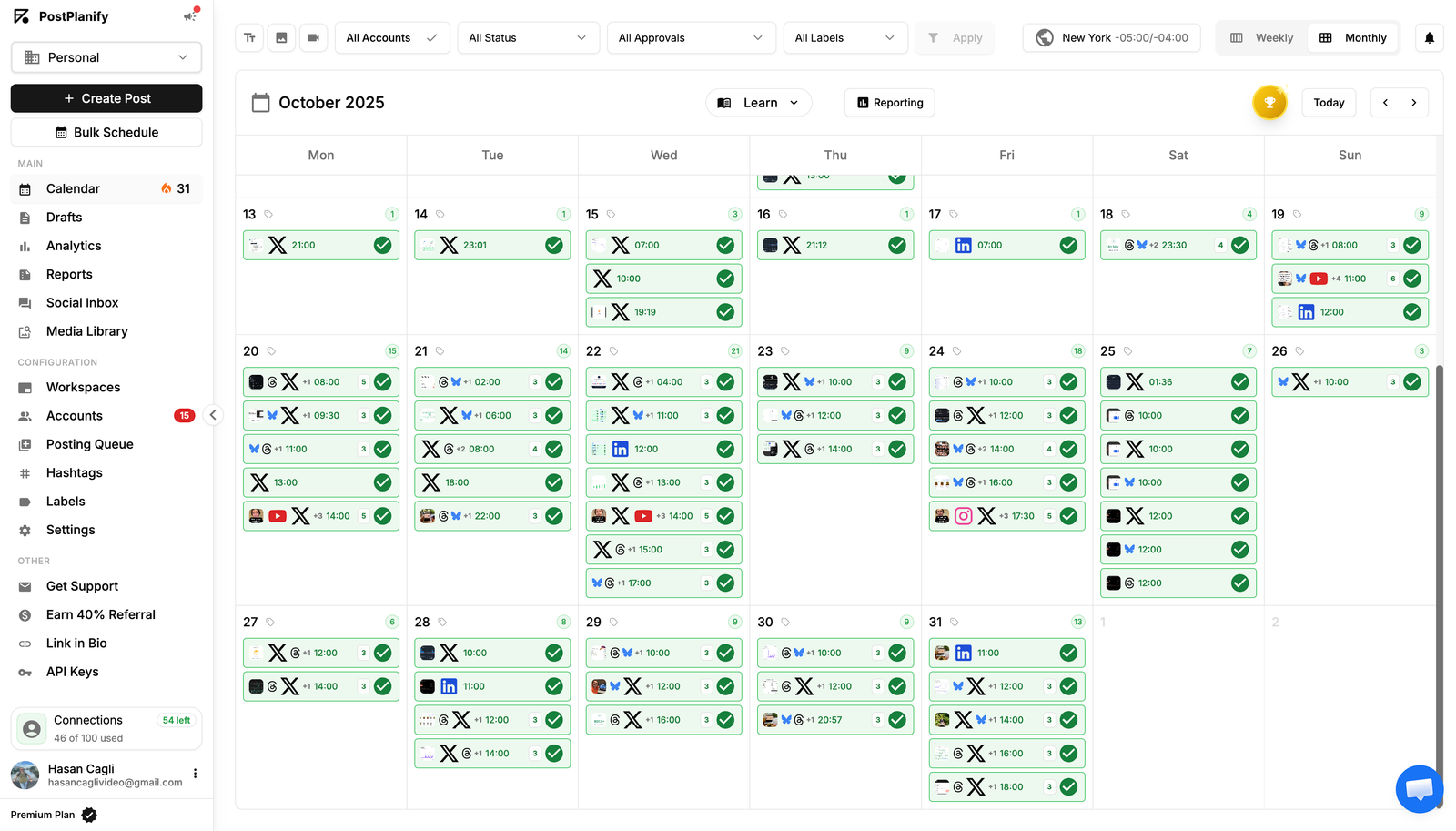
Shared content calendar
Your whole team sees the same calendar. No more spreadsheets or back-and-forth messages.
Automatic notifications
Approvers get notified when a post needs their review. Creators get notified when it's approved or rejected.
No password sharing
Social accounts are connected through official APIs. Team members never see your login credentials.
Multi-approver workflows
Designate specific people to approve each post. Nothing publishes until everyone signs off.
Shared content calendar
Your whole team sees the same calendar. No more spreadsheets or back-and-forth messages.
Automatic notifications
Approvers get notified when a post needs their review. Creators get notified when it's approved or rejected.
No password sharing
Social accounts are connected through official APIs. Team members never see your login credentials.
Who uses team collaboration?
Agencies and in-house teams coordinating social at scale.
Creators with a team
Let your editor or VA schedule posts while you focus on creating content. Approve before anything goes live.
Small businesses
Give your marketing person access to post without sharing passwords. Keep control with approval workflows.
Agencies
Manage multiple brands with different team members. Let clients approve their own content before publishing.
Why social media teams need a shared workspace
When multiple people manage social media for a brand, things get messy fast. Screenshots in group chats, spreadsheets for content calendars, and shared passwords for social accounts. A shared workspace gives everyone access to the same calendar, the same posts, and the same accounts without the chaos.
Roles and permissions for social media teams
Not everyone on your team should have the same access. An editor needs to create and schedule posts but shouldn't be able to delete social accounts. A client needs to approve content but doesn't need to edit it. PostPlanify has five roles: Owner, Admin, Editor, Viewer, and Client. Each role has specific permissions so you stay in control of who can do what.
How post approval workflows keep your brand safe
One wrong post can damage your brand. Approval workflows make sure nothing goes live without the right people reviewing it first. When creating a post in PostPlanify, you can designate specific team members as approvers. The post stays in a pending state until every approver has signed off. If someone rejects it, the creator gets notified with the reason so they can fix it.
No per-seat pricing
Most social media tools charge per team member. That adds up fast when you have editors, designers, account managers, and clients who all need access. PostPlanify includes team members on every paid plan: Growth (3 members), Premium (6 members), Scale (12 members), and Enterprise (unlimited). Add your team without per-seat fees.
Team collaboration for agencies
Agencies manage content for multiple brands, each with different teams and clients. PostPlanify lets you create separate workspaces for each brand, invite different team members to each one, and assign roles per workspace. A team member can be an Editor on one brand and a Viewer on another. Clients can approve their own content without seeing other brands.
Collaboration Features
Everything your team needs to ship social together — without the chaos.
Workspaces per brand
Run each client or brand in a separate workspace with its own calendar, members, and assets.
Role-based permissions
Owner, Admin, Editor, Author, and Client roles — granular controls for every team member.
Multi-step approvals
Route drafts from draft to review to scheduled with reviewer sign-off at every step.
Internal comments
Leave comments on any draft post. Tag teammates with @mentions and resolve threads.
Audit log
See who published what and when. Full history of every post, comment, and approval.
Flat pricing
No per-seat fees. Invite the whole team and your clients without watching your bill grow.
Why team collaboration matters
Per-seat pricing kills agency margins. PostPlanify charges flat.
Flat pricing scales with your team
Add unlimited teammates and clients within your plan's user limit. No per-seat fees, no bill shock.
Approvals prevent mistakes
Multi-step workflows catch errors before they go live. Clients review drafts, managers approve, nothing publishes by accident.
Internal context stays internal
Comments and @mentions happen on the post — not in scattered Slack threads. Decisions stay with the post they're about.
Audit log for accountability
See who scheduled what, who approved what, and who published what. Every action is logged and reviewable.
48165+
Posts published
10
Platforms supported
180K+
Social accounts connected
Join 2,150+ users who save time every week
See PostPlanify in action
Watch how teams plan, schedule, publish, and report on every social account — all from one dashboard.
Choose Your Plan
Start with a 7-day free trial. Cancel anytime.
Growth
For small teams and solo agency owners managing a few accounts.
$756 billed yearly
- 15 Social Accounts
- 5 Workspaces
- 3 Users
- Unlimited Posts
- Analytics
- Reply to Comments + DMs
- Bulk Schedule
- Media Library
- Shared Calendar
- Link in Bio
- Full API + MCP Access
- AI Assistant
- Custom Integrations*
Premium
For growing agencies with full team collaboration features.
$1,524 billed yearly
- Everything in Growth, plus:
- 30 Social Accounts
- 15 Workspaces
- 6 Users
- Advanced Analytics
- Reports
- Post Approvals
- Team Comments / @Mentions
- Roles & Permissions
- AI Training & Knowledge
- 400 AI Images / mo
Scale
For established agencies managing dozens of clients + need white-label.
$2,292 billed yearly
- Everything in Premium, plus:
- 100 Social Accounts
- 50 Workspaces
- 12 Users
- White-Label PDF Reports
- 800 AI Images / mo
- Priority Human Support
- Dedicated Onboarding & Migration
Enterprise
For larger agencies needing SSO and custom contracts.
Custom billed yearly
Save 20%- Everything in Scale, plus:
- Custom Social Accounts
- Unlimited Workspaces
- Unlimited Users
- Unlimited AI Images / mo
- 1:1 Onboarding Call
- Priority Feature Requests
- Private WhatsApp Support
*Google Drive, Canva, Unsplash and Dropbox
FAQ
Everything you need to know
Is there a per-seat fee for team members?
No — PostPlanify charges flat pricing, not per-seat. Invite your whole team (and clients) without your bill growing with every new hire.
Is there a per-seat fee for team members?
What team member roles are available?
Owner, Admin, Editor, Author, and Client roles. Each role has granular permissions for publishing, scheduling, and reviewing.
What team member roles are available?
How do team comments and @mentions work?
Leave comments on any draft post. Tag teammates with @mentions to pull them into a thread. Resolve threads once a decision is made.
How do team comments and @mentions work?
How does post approval work?
Multi-step approval workflows route posts from draft to review to scheduled. Reviewers approve, reject, or request changes with inline comments.
How does post approval work?
How do I invite someone to my team?
Go to Settings → Team and invite by email. They'll get an invite link to join your workspace with the role you assigned.
How do I invite someone to my team?
Can team members access multiple brands?
Yes — if you have multiple workspaces, team members can be added to any combination. They switch between brands with one click.
Can team members access multiple brands?
Can I remove a team member?
Yes — admins can remove team members at any time. Their scheduled posts can be reassigned or paused before removal.
Can I remove a team member?
What's the Client role for?
The Client role gives external reviewers limited access — they can review and approve posts but can't publish or edit. Perfect for agencies.
What's the Client role for?
Do team members need my social media passwords?
No — each team member logs in with their own account. Permissions are role-based, not password-based.
Do team members need my social media passwords?
Still have questions?
Can't find the answer you're looking for? Get started with a free trial or chat with our team.
Trusted by 2,150+ businesses