
Social media content calendar and scheduler.
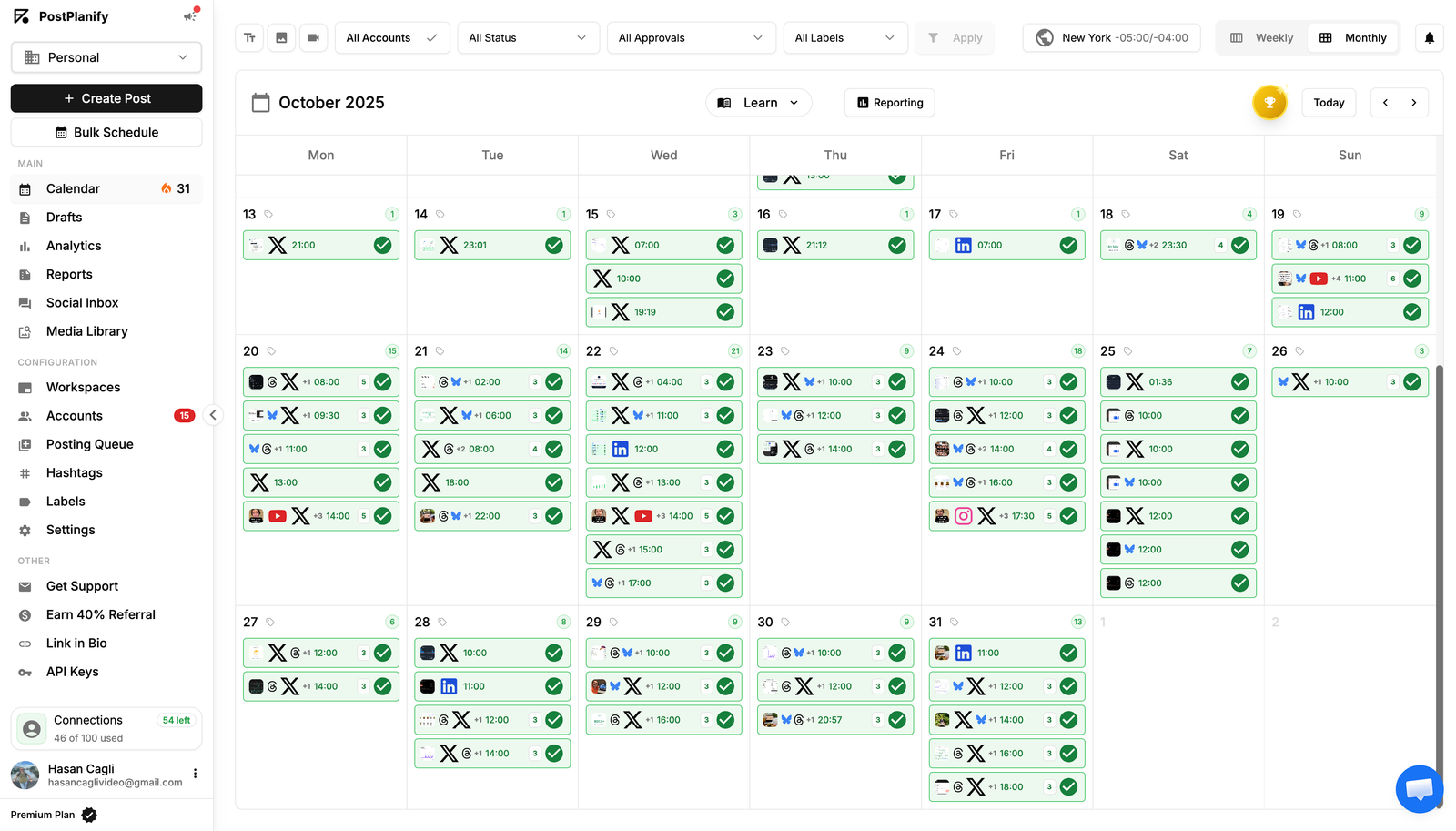
See all your scheduled posts in one calendar. Post to 10 platforms, bulk schedule up to 20 posts, preview before publishing, and keep your content consistent.
- 10 platforms supported
- Bulk schedule up to 20 posts
- Official platform APIs


Trusted by agencies and brands in 30+ countries





















Schedule in 3 steps
Connect your accounts
Link all your social accounts in minutes.
Create and schedule
Write, add media, pick a time. Or bulk schedule up to 20 posts at once.
Publish automatically
Posts go live on time. Track it all from your calendar.
Everything you need to plan and publish
Monthly, weekly, and list views
See the big picture or zoom into a single week. Filter by platform, status, or label.
Bulk schedule up to 20 posts
Upload media, customize each post, auto-assign dates, and schedule everything in one batch.
Platform-specific previews
See exactly how your post will look on each platform before it goes live. Real-time character counts included.
First comments and threads
Schedule a first comment to publish right after your post. Create threaded replies on X, Threads, and LinkedIn.
Hashtag manager
Save hashtag sets and insert them into captions with one click. No more copying and pasting.
Post queue with time slots
Set up recurring time slots and add posts to your queue. They go out automatically at the next available slot.
First comments and threads
Schedule a first comment to publish right after your post. Create threaded replies on X, Threads, and LinkedIn.
Hashtag manager
Save hashtag sets and insert them into captions with one click. No more copying and pasting.
Post queue with time slots
Set up recurring time slots and add posts to your queue. They go out automatically at the next available slot.
Who uses the content calendar?
From solo creators to global agencies — PostPlanify fits every workflow.
Creators
Batch a week of content in one sitting. Schedule across platforms and move on to creating.
Small businesses
Plan campaigns ahead of time. See everything scheduled at a glance without switching tools.
Agencies
Manage multiple brands from one calendar. Team members create, clients approve, posts go live on time.
Why you need a social media content calendar
Posting when you remember to isn't a strategy. A content calendar lets you plan ahead, stay consistent, and see gaps before they happen. When all your posts across every platform are in one place, you know exactly what's going out, when, and where. No more logging into 10 different apps to check what you've scheduled.
Schedule posts to 10 platforms at once
PostPlanify lets you write one post and schedule it to Instagram, TikTok, X, YouTube, Facebook, LinkedIn, Pinterest, Threads, Bluesky, and Google Business at the same time. Each platform gets its own caption with the right character limits and content format. Select your accounts, pick a date, and everything goes live on schedule.
Bulk scheduling for content batching
If you create content in batches, bulk scheduling saves hours. Upload up to 20 media files, customize captions and accounts for each one, then auto-assign dates based on how many posts per day you want. The system spreads them out across your chosen time slots. One session, an entire week or month of content scheduled.
Preview posts before they go live
Every platform displays posts differently. Instagram crops images, X truncates text at 280 characters, LinkedIn shows link previews. PostPlanify shows you a real-time preview for every platform so you can catch formatting issues before they go live. What you see in the preview is what your audience sees.
First comments, threads, and hashtag management
Schedule a first comment to publish right after your post for extra hashtags or context without cluttering the caption. Create threaded replies on X, Threads, and LinkedIn for longer narratives. Save your most-used hashtag sets and insert them into any caption with one click.
Built for teams and agencies
The content calendar is shared across your team. Editors create posts, clients approve them, and everything publishes on time. Filter by brand, platform, status, or label to find what you need. Use the approval workflow to make sure nothing goes live without sign-off. Every post tracks who created it and who approved it.
What You Can Schedule
Every native content type across every platform — all from one composer.
Feed posts
Single images, multi-image carousels, and text-only posts on every supported platform.
Reels and Shorts
Vertical video with captions, covers, audio, and trending sounds — scheduled in advance.
Stories
Photo and video Stories with stickers, links, and mentions — natively scheduled.
Long-form videos
YouTube uploads, LinkedIn articles, and full-length Facebook videos with thumbnails.
Threads and carousels
X threads, Threads posts, and LinkedIn document carousels — scheduled as connected posts.
Polls and questions
X polls, LinkedIn polls, Stories question stickers, and engagement-driving formats.
Why a content calendar changes everything
The hidden cost of posting ad hoc is reach, consistency, and your team's sanity.
Consistency compounds
Algorithms reward predictable posting cadence. A calendar makes consistency a default — not a daily scramble.
Bulk batching saves hours
Schedule 20 posts in one sitting instead of publishing live every day. Reclaim a full workday every week.
Visibility across brands
See every brand, every account, every post in one place. No more spreadsheet silos and missed deadlines.
Approvals without friction
Multi-step approvals, internal comments, and audit logs make client review fast — not painful.
48165+
Posts published
10
Platforms supported
180K+
Social accounts connected
Join 2,150+ users who save time every week
Plan your content. Publish on autopilot.
Start your free trial — no credit card required. Cancel anytime.
- Free 14-day trial
- No credit card
- Cancel anytime
See PostPlanify in action
Watch how teams plan, schedule, publish, and report on every social account — all from one dashboard.
Choose Your Plan
Start with a 7-day free trial. Cancel anytime.
Growth
For small teams and solo agency owners managing a few accounts.
$756 billed yearly
- 15 Social Accounts
- 5 Workspaces
- 3 Users
- Unlimited Posts
- Analytics
- Reply to Comments + DMs
- Bulk Schedule
- Media Library
- Shared Calendar
- Link in Bio
- Full API + MCP Access
- AI Assistant
- Custom Integrations*
Premium
For growing agencies with full team collaboration features.
$1,524 billed yearly
- Everything in Growth, plus:
- 30 Social Accounts
- 15 Workspaces
- 6 Users
- Advanced Analytics
- Reports
- Post Approvals
- Team Comments / @Mentions
- Roles & Permissions
- AI Training & Knowledge
- 400 AI Images / mo
Scale
For established agencies managing dozens of clients + need white-label.
$2,292 billed yearly
- Everything in Premium, plus:
- 100 Social Accounts
- 50 Workspaces
- 12 Users
- White-Label PDF Reports
- 800 AI Images / mo
- Priority Human Support
- Dedicated Onboarding & Migration
Enterprise
For larger agencies needing SSO and custom contracts.
Custom billed yearly
Save 20%- Everything in Scale, plus:
- Custom Social Accounts
- Unlimited Workspaces
- Unlimited Users
- Unlimited AI Images / mo
- 1:1 Onboarding Call
- Priority Feature Requests
- Private WhatsApp Support
*Google Drive, Canva, Unsplash and Dropbox
FAQ
Everything you need to know
Which platforms can I schedule to?
PostPlanify supports scheduling to Instagram, TikTok, LinkedIn, X (Twitter), Facebook, YouTube, Threads, Pinterest, Bluesky, and Google Business Profile — all from one calendar.
Which platforms can I schedule to?
How many posts can I bulk schedule at once?
Up to 20 posts per CSV upload. You can also bulk upload image batches and platform-specific previews in a single action.
How many posts can I bulk schedule at once?
What content types can I schedule?
Feed posts, carousels, Reels, Stories, Shorts, long-form videos, threads, polls, pins, and Google Business posts — every native format on every platform.
What content types can I schedule?
What calendar views are available?
Monthly, weekly, and list views. Switch between them instantly. Drag-and-drop to reschedule, click to edit, and zoom out for a quarterly content plan.
What calendar views are available?
Can I schedule a first comment?
Yes — PostPlanify auto-posts your hashtags or link as a first comment alongside the main post on Instagram, Facebook, LinkedIn, and more.
Can I schedule a first comment?
Can I schedule threads?
Yes — write native threads for X (Twitter) and Threads. PostPlanify publishes each post in the thread at the right interval.
Can I schedule threads?
Can I save posts as drafts?
Yes — every draft is saved automatically and is searchable from the calendar. Reuse, edit, or move drafts to scheduled in one click.
Can I save posts as drafts?
Does the content calendar support different time zones?
Yes — set your workspace time zone and override per post. Scheduling is always in your local time, with platform-aware timezone handling.
Does the content calendar support different time zones?
Can I preview how posts will look?
Every scheduled post shows a platform-accurate preview — the right crop, caption length, and hashtag placement before publishing.
Can I preview how posts will look?
Can I reschedule a post after it's been scheduled?
Yes — drag-and-drop to move any post. Rescheduling is instant and works for already-published posts to recycle evergreen content.
Can I reschedule a post after it's been scheduled?
Still have questions?
Can't find the answer you're looking for? Get started with a free trial or chat with our team.
Trusted by 2,150+ businesses